Threat Modeling AI Apps
Table of contents
- Why Threat Modeling Still Matters
- When Prevention Isn’t Possible
- Threat Modeling for Detection Engineering
- A Practical Threat Modeling Workflow
- Using the Microsoft Threat Modeling Tool
- Worked Example: Agentic AI Support Assistant
- Closing Thoughts
Why Threat Modeling Still Matters
Threat modeling is just structured thinking about how a system can be abused, and at a practical level we’re trying to answer a few simple questions:
- What are we protecting?
- How can an attacker reach it?
- What can go wrong at each step?
- What controls do we have (or need)?
- If we can’t prevent it cleanly, how do we detect and respond quickly?
For detection engineers this is huge, because instead of writing detections from random ideas (or only from previous incidents), we can build detections from known attack paths in our own environment and get better coverage with fewer “interesting but not relevant” detection rules.
When Prevention Isn’t Possible
“Prevent everything” sounds great on paper, but production systems are messy.
A few common reasons preventive controls fall short:
- Business friction: hard blocks can break critical user workflows.
- Legacy constraints: older systems can’t support modern controls quickly.
- Third-party dependencies: we don’t fully control external services.
- Operational tradeoffs: strict controls can create reliability pain.
- Model uncertainty: LLM behavior is probabilistic, so hard prevention isn’t always deterministic.
This gets even more real in agentic AI systems - we should absolutely use guardrails, system prompts, policy checks, and least privilege, but teams still need to prepare for bypass attempts, indirect prompt injection, tool abuse, and data exfiltration patterns that slip past prevention. That’s where detection engineering acts as a compensating control.
Threat Modeling for Detection Engineering
A good model should create detection work, not just documentation.
One pattern that works well:
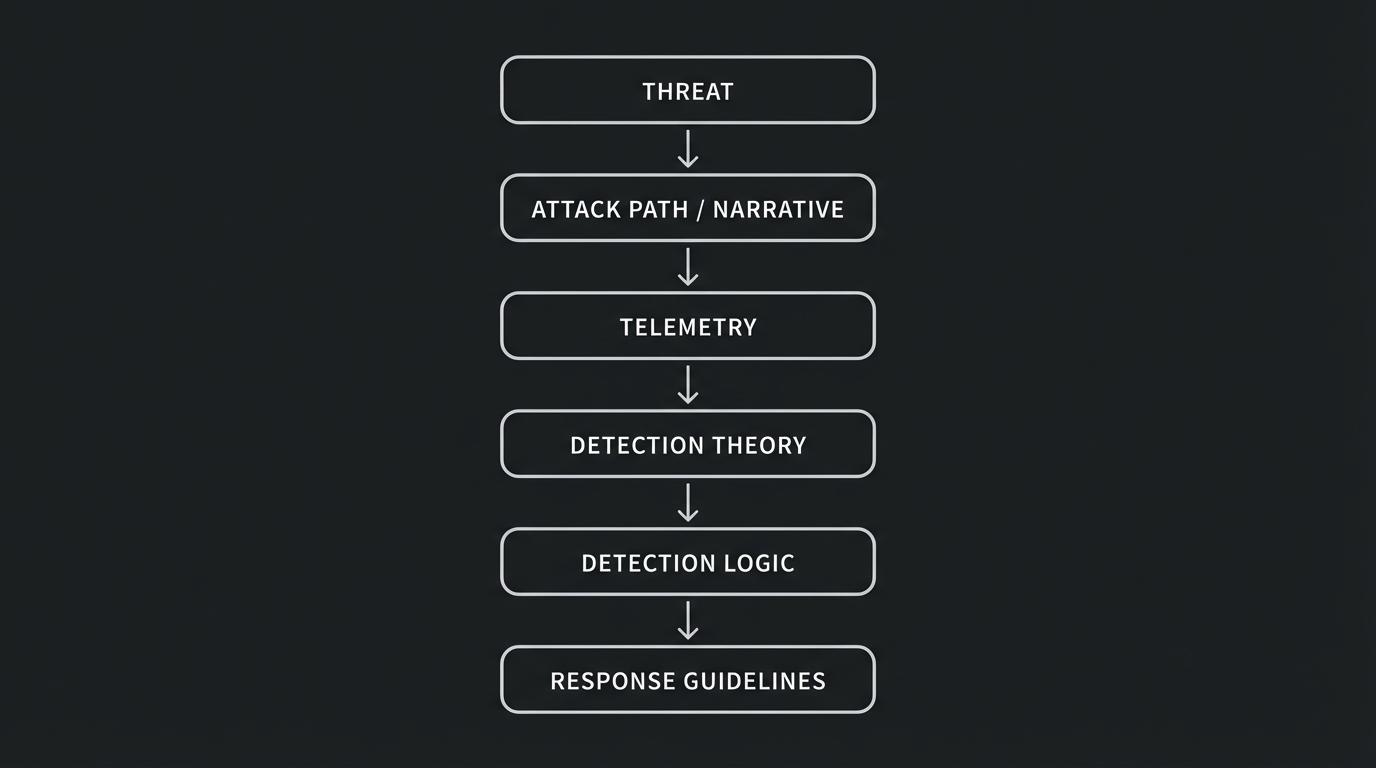
If you can fill in each stage you have something actionable.
Example:
- Threat: indirect prompt injection through untrusted retrieved content, such as malicious instructions embedded on a fetched website.
- Attack path: attacker plants malicious instructions on a compromised website, agent ingests it, and then performs unintended sensitive actions.
- Telemetry: HTTP request/fetch logs (URLs visited by the agent), retrieved content/payload logs, prompt and completion metadata, tool invocation audit logs, session identity and auth events.
- Detection theory: using the telemetry we have, how can we detect the attack narrative at various stages of the attacker’s path?
- Detection logic: alert when anomalous or malicious instruction-like content is retrieved and sensitive tool calls follow soon after.
- Response: revoke credentials/tokens if needed, quarantine source, investigate timeline for RCA and blast radius.
Prioritization That Actually Helps
I like a simple framework that’s easy to follow:
- Impact
- Likelihood
- Preventability gap
- Detectability with current telemetry
High impact plus high likelihood plus low preventability is the sweet spot for incentive to get detections out ASAP.
A Practical Threat Modeling Workflow
Keep it lightweight and repeatable - a model you actually use beats a perfect model you never update.
1) Define scope and critical assets
Pick one clear workflow or feature boundary.
For AI apps, common assets include:
- internal documents and user data
- API keys and service credentials
- tool/action permissions
- system prompts and policy context
- downstream systems (ticketing, email, CRM, code repos)
2) Diagram system and data flows
Map how data and actions move:
- user input
- retrieval (RAG/vector/search)
- model runtime
- tool calls
- external integrations
- logging/monitoring pipeline
This is where attack paths become obvious.
3) Identify trust boundaries
A trust boundary is any point in the system where the level of trust changes between two components. In other words, it’s where data or control crosses from one security context into another, like when an unauthenticated internet user’s input reaches your backend, or when your agent runtime calls a privileged tool that can read customer records. Every time data crosses a trust boundary, we should be asking: “what could go wrong if this input is malicious or this component is compromised?”
Trust boundaries are critical for detection engineering because they’re natural instrumentation points - if you can log and inspect traffic at each boundary crossing, you have visibility into where attacks transition from one stage to the next.
Typical boundaries for agentic systems include:
- internet user to app backend (untrusted input enters the system)
- app to retrieval/indexed content sources (content from external or shared sources could be poisoned)
- app to LLM provider (prompts and completions cross an external API boundary)
- agent runtime to privileged tools (the agent escalates from reasoning to action with real-world impact)
- app to customer data stores (access to sensitive data that could be exfiltrated)
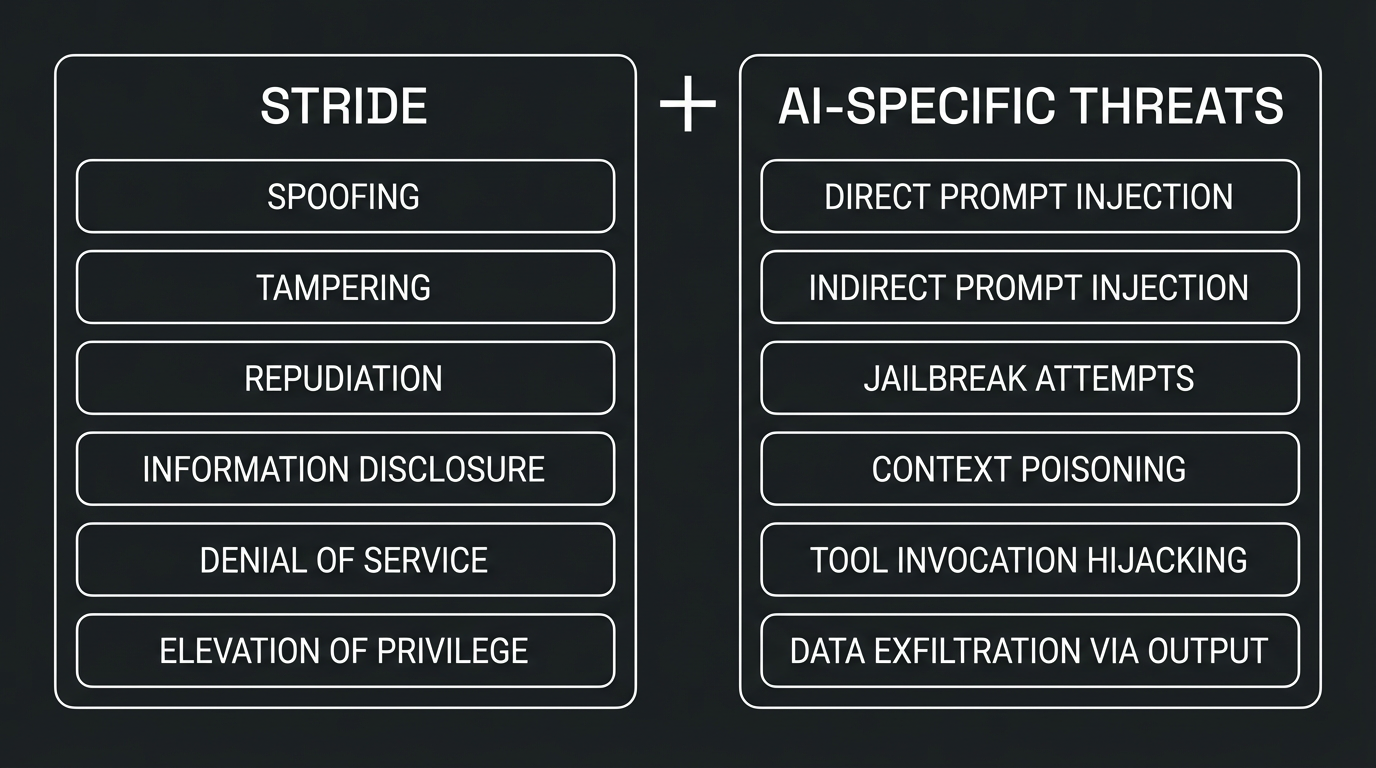
4) Enumerate threats with STRIDE (plus AI-specific abuse)
STRIDE still works well, and for AI systems we layer on additional abuse patterns:
5) Decide controls (preventive and detective)
For each threat:
- what can we prevent now?
- what can we partially or are very limited in preventing?
- what must we detect and respond to?
Make detection outputs explicit and avoid leaving this as a vague “SOC will monitor it” note.
6) Prioritize and assign owners
Turn findings into backlog items with owners across:
- app engineering
- platform/security engineering
- detection engineering
- SOC/IR
Revisit the model when architecture changes, tools are added, or major incidents occur.
Using the Microsoft Threat Modeling Tool
The Microsoft Threat Modeling Tool is a great option because it’s free, structured, and fast to adopt. It gives teams a good out-of-the-box solution to start visualizing an application’s architecture.
Practical Setup Flow
- Create a model and lock scope to one workflow.
- Build the DFD (entities, processes, stores, flows).
- Add trust boundaries.
- Generate threats (the tool does this automatically based on your DFD) and triage the results, since not every generated threat will be relevant to your environment.
- Tag each threat as
Prevent,Detect,Respond, orAccept. - Export and convert high-priority findings into implementation tickets.
Keeping Signal High
- model reality, not ideal architecture
- split giant systems into smaller models
- involve app owners in triage
- prioritize high-impact abuse cases first
Worked Example: Agentic AI Support Assistant
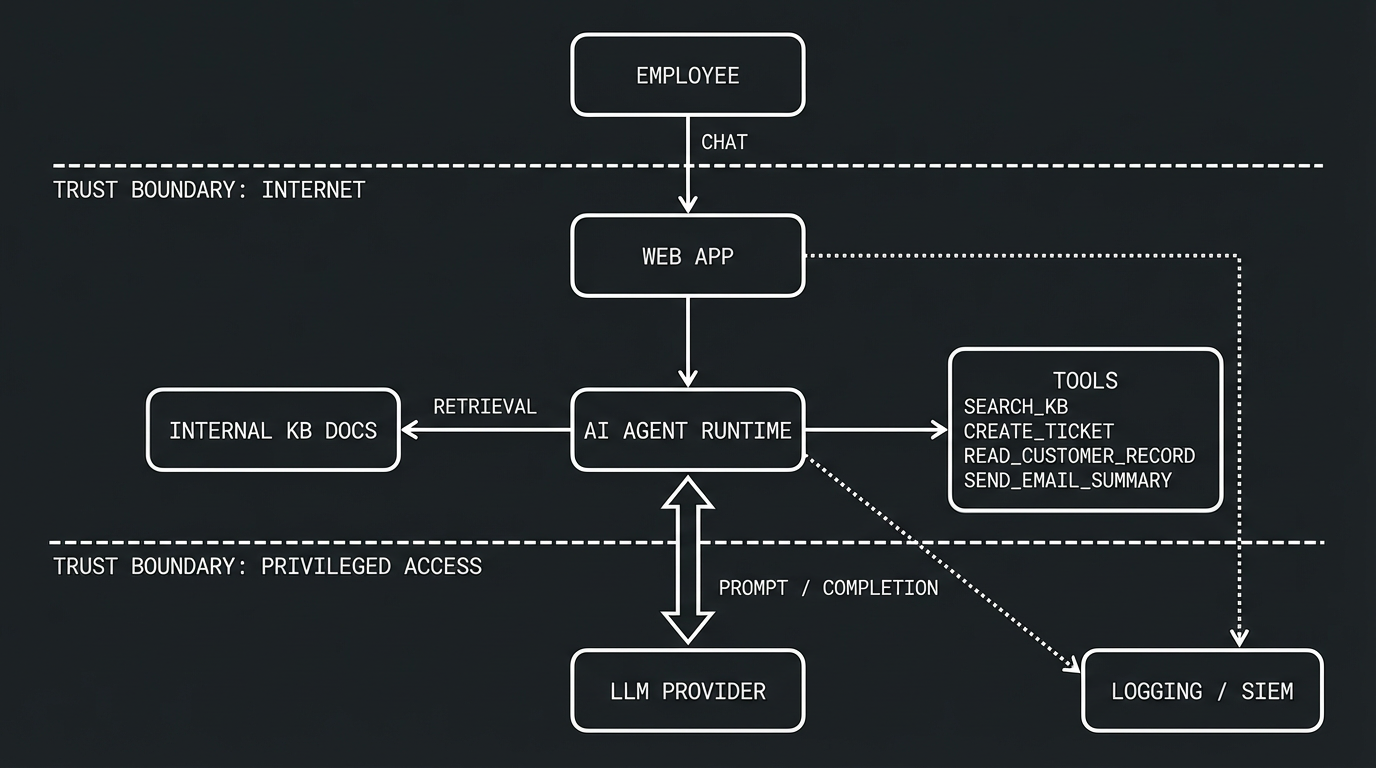
Let’s use a simple scenario that mirrors a lot of real-world internal AI deployments.
Scenario
An internal support assistant has agentic capabilities:
- employees chat through a web app
- app uses an LLM and retrieval from internal KB docs
- agent can call tools:
search_kbcreate_ticketread_customer_recordsend_email_summary
- app logs prompts, responses, tool calls, and auth events
Threat Focus: Prompt Injection Flavors
Direct prompt injection
User attempts to override policy directly in chat input (for example, asking the model to ignore controls or expose hidden instructions).
Detection ideas:
- detect jailbreak/bypass language patterns
- alert on high-risk prompt score plus sensitive tool invocation
- baseline repeated bypass attempts by user/session/source
Indirect prompt injection
Malicious instructions are embedded in retrieved documents and influence tool selection or output behavior.
Detection ideas:
- scan retrieved chunks for instruction-like markers
- correlate risky retrieval with privileged tool calls
- alert when post-retrieval behavior deviates from baseline
Context poisoning / memory abuse
Attacker attempts to persist malicious context so that future responses and agent decisions drift from intended behavior.
Detection ideas:
- monitor writes to memory/state with policy-aware rules
- alert on abrupt shifts in agent decision patterns
- version and diff memory/state artifacts for suspicious changes
Tool invocation hijacking
Prompt manipulation nudges the agent into technically valid but abusive tool usage, like bulk reading customer records under the guise of a summary request.
Detection ideas:
- detect unusual tool chains (sequence + timing)
- alert on role-to-action mismatches
- detect argument volume anomalies for sensitive tools
Data exfiltration through model output
The model is coerced into disclosing sensitive context or data returned by tool calls in its response to the user.
Detection ideas:
- run DLP-like checks on model output streams
- alert on credential-like, token-like, or PII-heavy responses
- correlate exfil indicators with earlier sensitive tool access
Example Detection Backlog
-
Detect risky retrieval-to-tool chain in a short time window. An attacker plants malicious instructions in a document or webpage that gets retrieved by the agent, and shortly after the agent invokes a sensitive tool it wouldn’t normally call in that context.
-
Detect bypass campaign behavior across users/sessions. A user (or multiple users) repeatedly attempts prompt injection or jailbreak variations in a short period, probing for a technique that slips past guardrails.
-
Detect anomalous privileged tool usage by role. A user’s session triggers tool calls that don’t match their role or typical usage pattern, like a help desk employee’s session bulk-reading customer records it normally never touches.
-
Detect sensitive data exfil indicators in model output. The model’s response contains credential-like strings, PII patterns, or unusually large volumes of sensitive data that suggest the prompt coerced it into leaking context or tool-returned information.
-
Detect suspicious memory poisoning followed by behavior drift. An attacker writes or modifies persistent agent memory/state in a way that causes future sessions to behave differently, such as silently skipping policy checks or routing actions to unintended targets.
-
Detect anomalous command execution on the underlying infrastructure. An attacker chains prompt injection into tool calls that lead to suspicious command execution on the underlying host or platform, indicating activity like persistence mechanisms or data exfiltration.
Tie Each Detection to Response
Detection without response is only half a control, so map each detection rule to concrete actions:
- terminate suspicious sessions
- revoke or rotate impacted credentials
- temporarily disable high-risk tools (likely hard to do without a very high severity incident + CSO)
Closing Thoughts
Threat modeling for AI systems doesn’t need to be heavyweight to be useful, and done well it gives detection engineering a clear map of where attackers can push, where prevention is weak, and where monitoring needs to be strongest.
If you can’t fully prevent a path today, that doesn’t mean you’re stuck - it means we define the path, instrument it properly, and build response-ready detections that reduce blast radius.
Posted 01/19/2026